 MDML
MDMLSupplier ordering · RoleCall
Restaurant par levels that write the order.
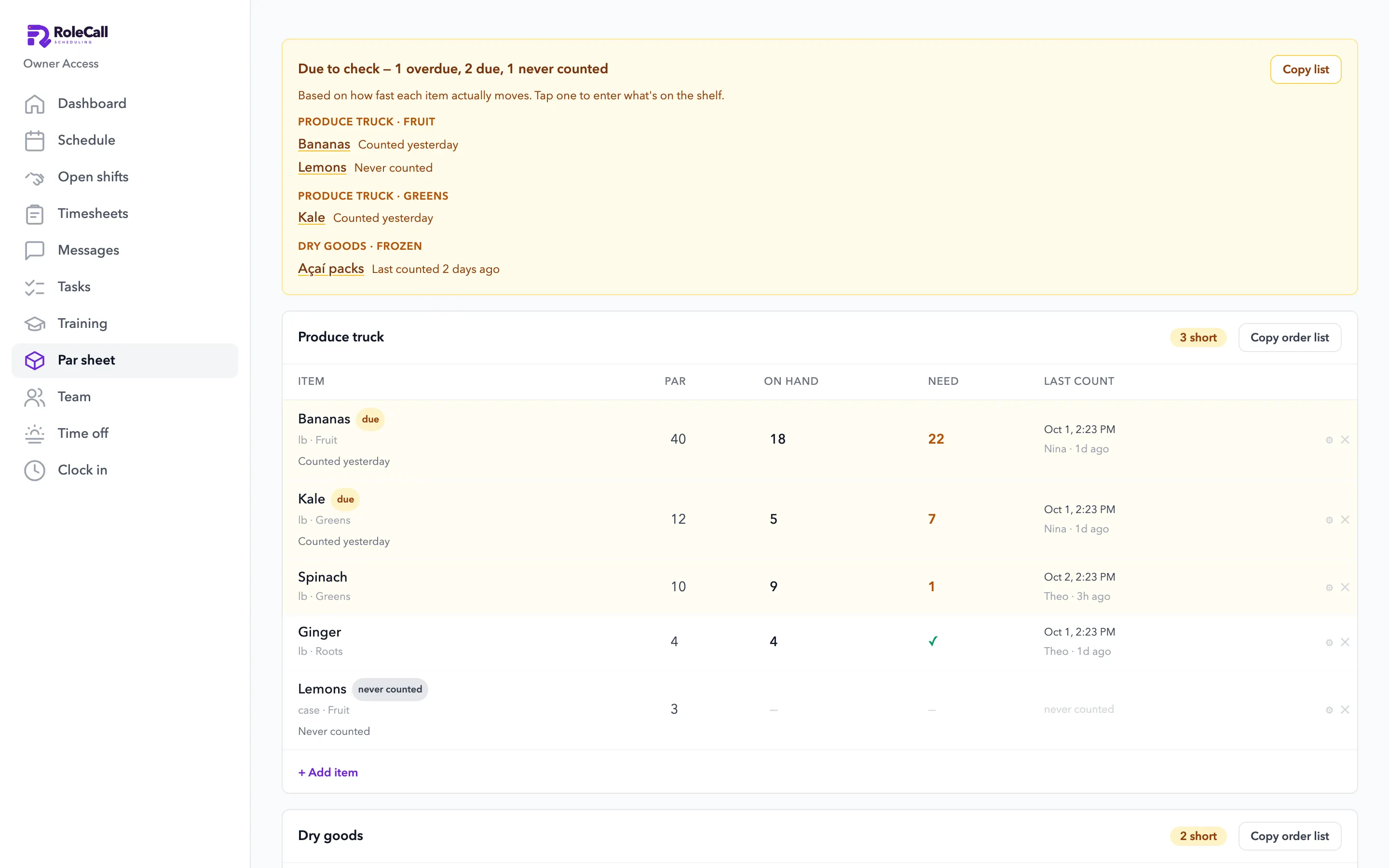
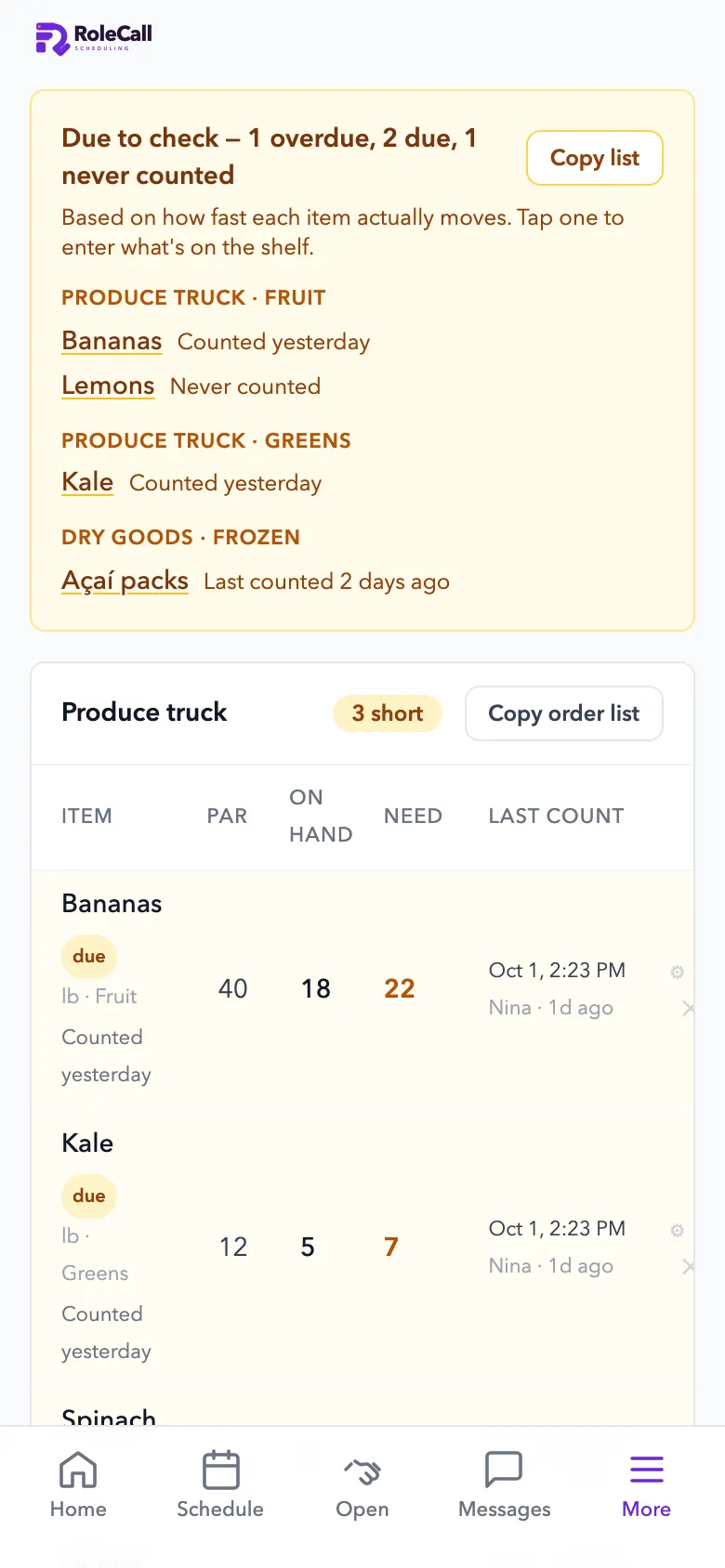
Set a par for each item and your team counts what's due. The order list builds itself by supplier, ready to copy and send.
Built inside a working café, on its own counts, sales and receipts. The items shown are a sample.
Price
Supplier ordering on its own, or in Everything.
Available now
Compare every planBought one by one, all 8 parts cost $578 a month for a restaurant or shop. Everything is $249.
1.0 The order list
The order, already written.
Par, on hand and what to order, by supplier. Log the order, then mark it received.
- By supplierEach supplier's list with what's short.
- Copy and sendOne tap copies the order list.
- Cases and packsFor shops, an order rounds up to whole packs: buy the case, sell singles.
- Ordered and receivedLog orders and mark them received, so on hand stays right.
2.0 Counting
What to count, and when.
Staff don't count everything every day. They count what's due, by the package, and the app asks when a number looks off.
- A due listItems due or overdue to count, based on how fast each one moves.
- Usage from three signalsRecipes times your Square sales, how fast you buy it from your receipts, and shelf counts.
- Count by the case, bag or tubWith a photo of each package, so a new hire counts it the same way.
- Pushes when it matters“Running low” to the people on shift, and an alert to managers if a count is missed.
3.0 Ordering agent
Carts at the cheapest stores. You check out.
An AI agent turns what's due into store carts, picks the cheapest stores using the fees on your own receipts, and fills the carts. It never pays.
- Your suppliers' rulesEarly accessOrder minimums, days to the shelf and truck days, set once in How we order.
- Real fees, from real receiptsEarly accessDelivery, service and tip fees from the last 120 days of your receipts. A second store is only added when the savings beat its fees.
- What's already comingEarly accessIt respects storage space, orders already on the way, lead times and minimums.
- Carts filled, never checked outEarly accessA cart marked as placed is refused. You review and check out every cart yourself.
Questions
Asked and answered.
- How much does it cost?
- Order lists come with Inventory, $99 a month per location. Every part of MDML is in Everything for $249 a month per location ($49 your first month). Auto-cart, which fills store carts for you, is $39 a month on top.
- Does it place orders?
- No. It builds the order list by supplier, ready to copy and send. Carts can be filled for you at the cheapest stores, but checking out is always yours.
- How does it know what to order?
- You set each item's par. Staff count what's due, and the list shows what's short for each supplier. Usage is learned from recipes times sales, your receipts and your counts.
- Can it handle cases and packs?
- Yes. Staff count by the case, bag or tub, with a photo of each package. For shops, an order rounds up to whole packs.
- What about deliveries?
- Log what you ordered, then mark it received when it arrives, so on hand stays right.
Goes with
More that works with it.
- InventoryCounts that learn, orders that add up.
- Recipe costingFree recipes, plate costs and menu pricing. Automatic sales costing when you upgrade.
- EverythingEvery part, one price per location.
- For restaurants and cafésStock, schedules, the kiosk and the kitchen screen.
- For retail shopsSchedules, a time clock and stock counts.
Count what's due. Send the order.
Open RoleCall, add your items and pars, and copy your first order list.