 MDML
MDMLFree recipe costing · RoleCall
Know what each plate costs. Start free.
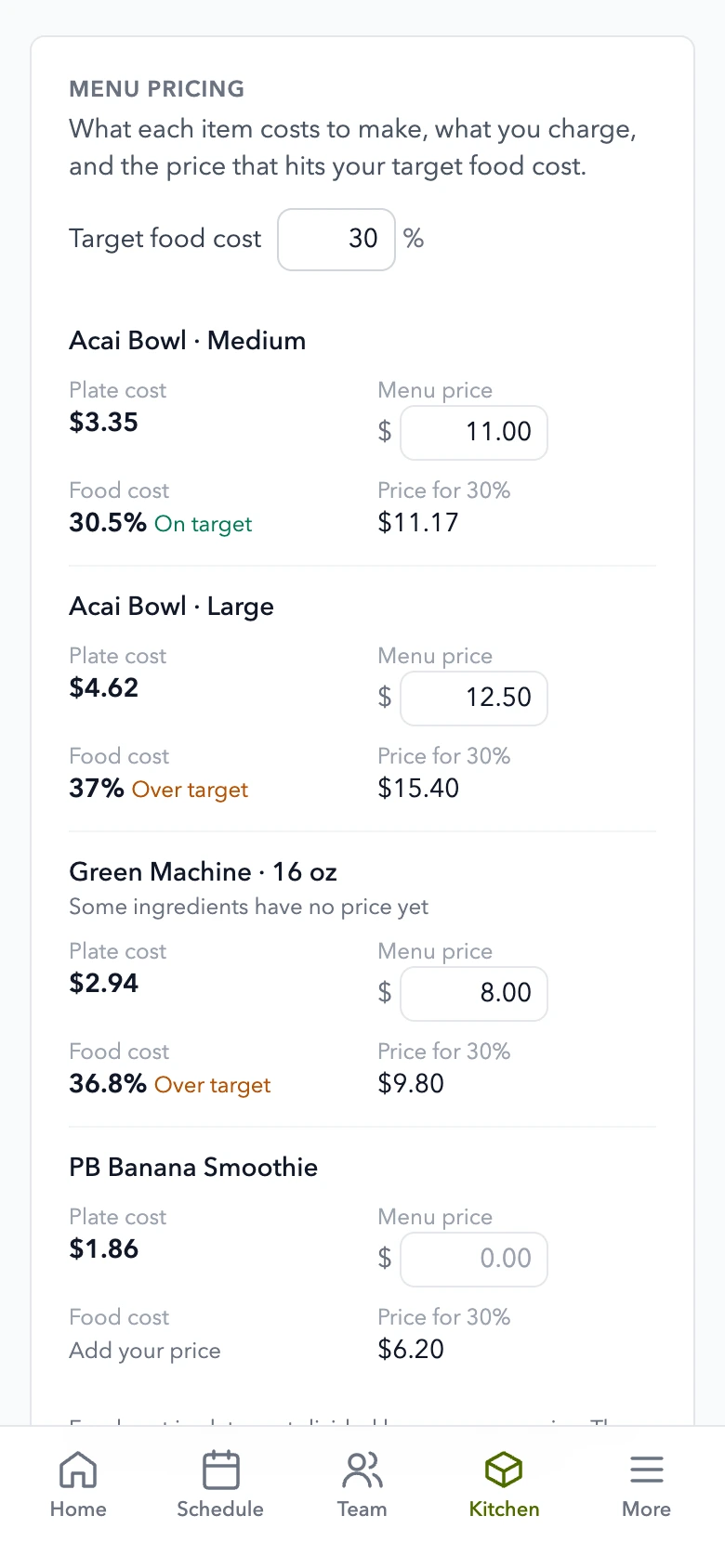
Enter your ingredient prices, build recipes and batches, and compare each plate cost with your menu price. Pick your own food-cost target and see the price that meets it. No card needed.
The screenshot uses an invented café. Free is a RoleCall account, with scheduling for up to five people too.
Price
Start with manual costing. Upgrade for automatic costs.
Available now
Compare every planBought one by one, all 8 parts cost $578 a month for a restaurant or shop. Everything is $249.
1.0 Free manual costing
Your ingredients. Your prices.
Type the cost of each ingredient, then add what goes into each menu item. Plate cost follows the quantities you enter.
- Ingredient costsEnter prices per ounce, per each or per pound.
- Recipes and prep batchesA batch has a yield, and menu items use a share of it. Sizes and add-ons can have recipes too.
- Menu pricingEnter what you charge and choose a target food-cost percentage. Compare your actual percentage with the price that would meet your target.
- Your live menu stays yoursThese worksheet prices do not change Square or your published menu.
2.0 The one-time AI trial
Try an AI import. Keep the final say.
50 AI credits once, with no monthly refill. Each AI request must fit the trial credits left. Try a small recipe import, check the preview, then save what you approved.
- Check before savingAI returns a preview of ingredients and recipes. You review it before anything is saved.
- Manual tools keep workingWhen the trial is used, you can still add ingredients, build recipes and edit menu prices by hand.
- No recurring free AIThe trial never refills. Larger AI jobs need a paid plan and enough AI credits.
3.0 When you need automatic costs
Connect costs to sales. With Inventory or Everything.
The paid Inventory module adds the parts that work from your sales and receipts, alongside counts and ordering.
- Food cost from Square salesEach matched sale is costed from its recipe, so you can compare food cost with labor on the home screen.
- Prices from receiptsEarly accessCaptured receipts can update ingredient prices; you can still review what changed.
- Counts, pars and orderingKeep stock counts and make supplier order lists. These are paid features, separate from manual recipe costing.
Questions
Asked and answered.
- What is free?
- Free for up to 5 people: scheduling, the time clock and manual recipe costing, 1 location. Add ingredient prices, build recipes and prep batches, see plate costs and compare menu prices with your own food-cost target. No card is needed.
- Is AI included?
- 50 AI credits once, with no monthly refill. Each AI request must fit the trial credits left. The trial works in the assistant and recipe import. Some requests need more than the trial can cover; manual recipe entry keeps working after it is used.
- What does the paid plan add?
- Inventory, $99 a month per location, adds costing against Square sales, prices from receipts, counts, pars and ordering. Every part of MDML is in Everything for $249 a month per location ($49 your first month).
- Does changing a menu price here change Square?
- No. This price is for your costing worksheet. Your Square menu and published prices stay as they are.
- What about prep batches?
- A batch has a yield, like a tub that makes 128 oz, and menu items draw from it. A size can be a share of another size.
Goes with
More that works with it.
- InventoryCounts that learn, orders that add up.
- Supplier orderingThe order list by supplier, from your pars and counts.
- Start a businessA researched plan for your idea, with the licenses and filings it needs.
- EverythingEvery part, one price per location.
- For restaurants and cafésStock, schedules, the kiosk and the kitchen screen.
Start with your top sellers. Build the rest as you go.
Open a free account, add an ingredient and build your first recipe. No card needed.