RoleCall by MDML

Run the place from one app.

Schedules from a forecast, stock counts that learn, and an assistant that does the work. For owners, managers and staff, on the web and iPhone.

Built inside a working café. The people and shop in these screenshots are a sample.
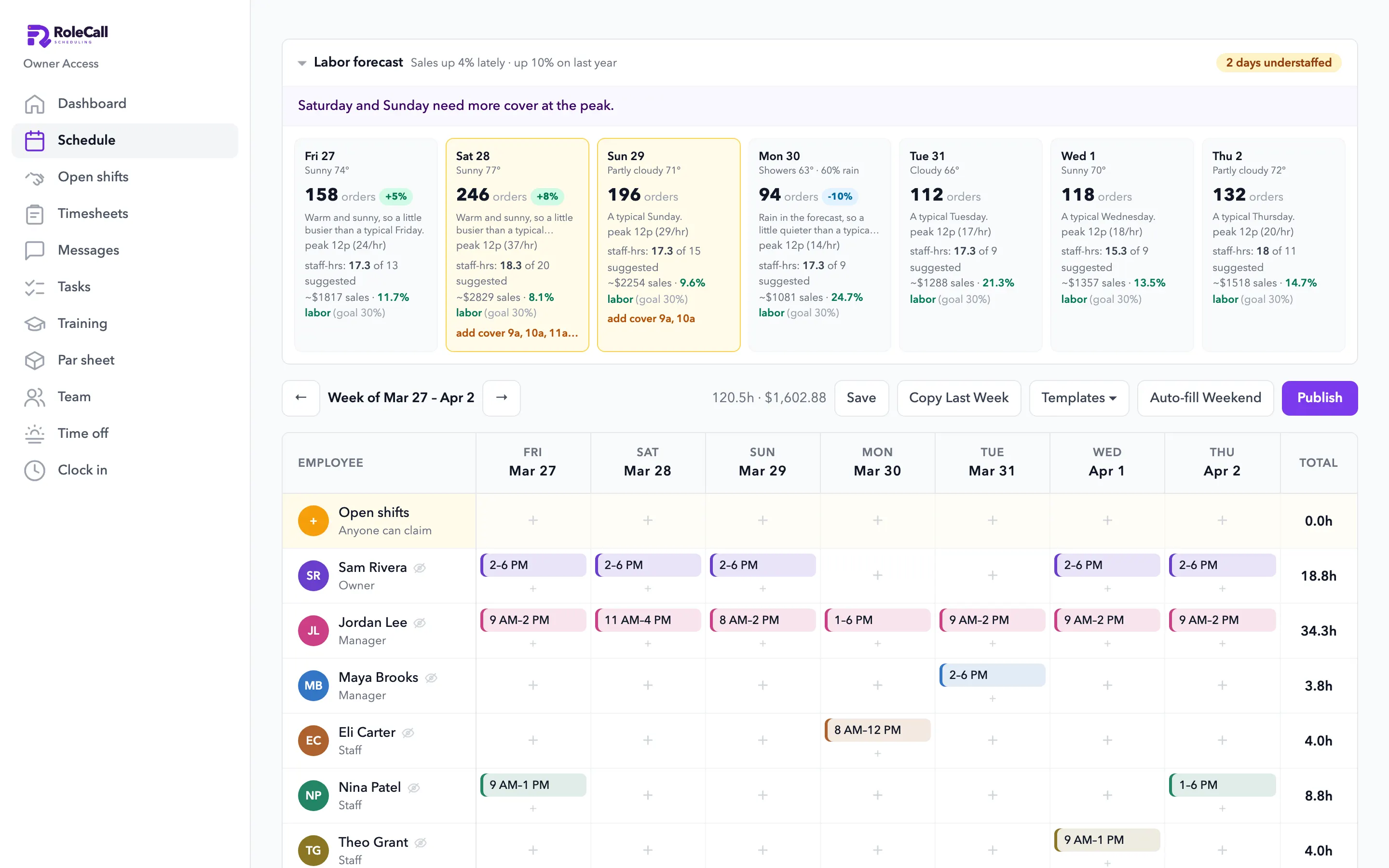
RoleCall in a browser: the labor forecast by day, with weather and labor cost, above the week's schedule
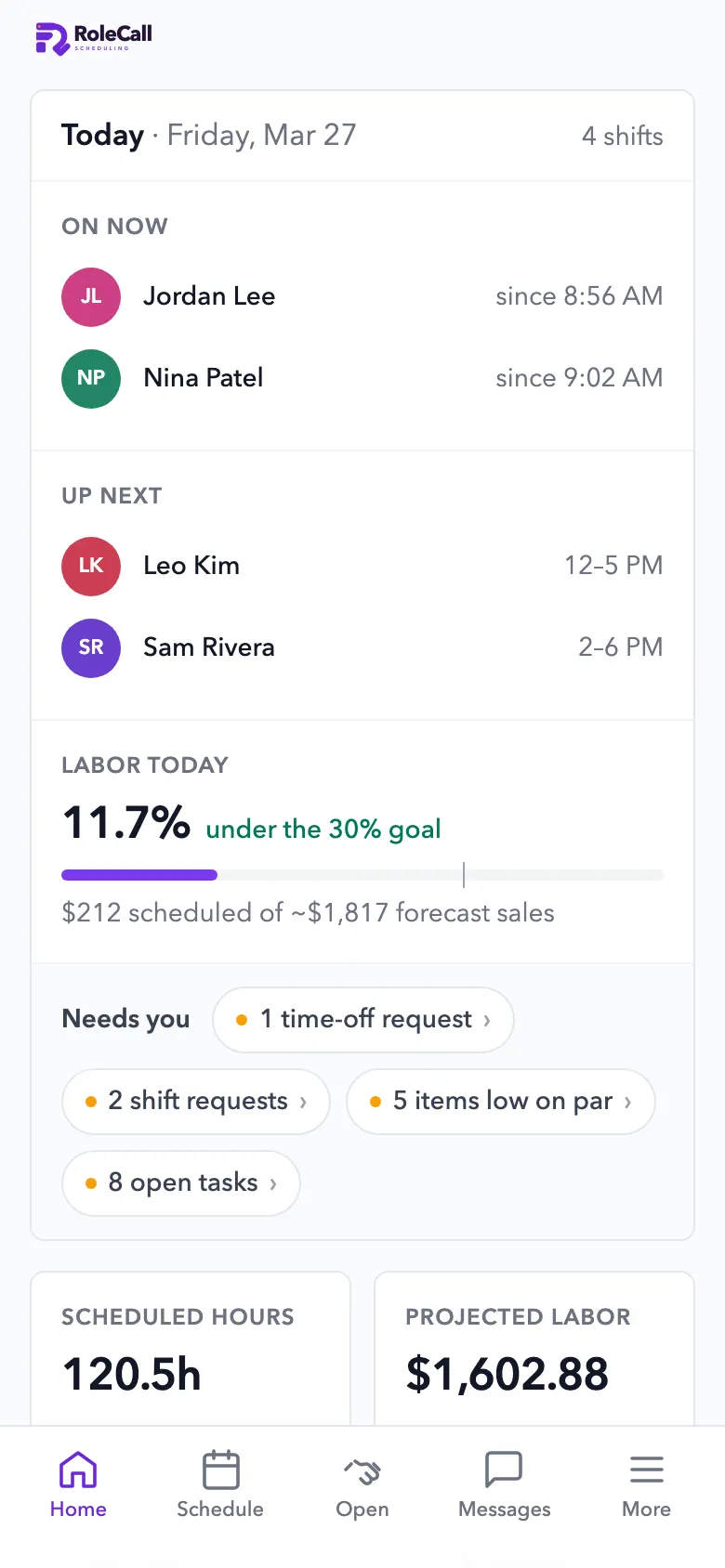
RoleCall's home screen: who's on now, labor against the goal, and a Needs-you row

1.0 Schedules

Schedules from a forecast. Not from a hunch.

It reads your Square sales and tells you which days are short-staffed, before you publish.

  • A forecast for every dayOrders by the hour from your own sales, the season, the recent trend, rain, holidays and local events you add.
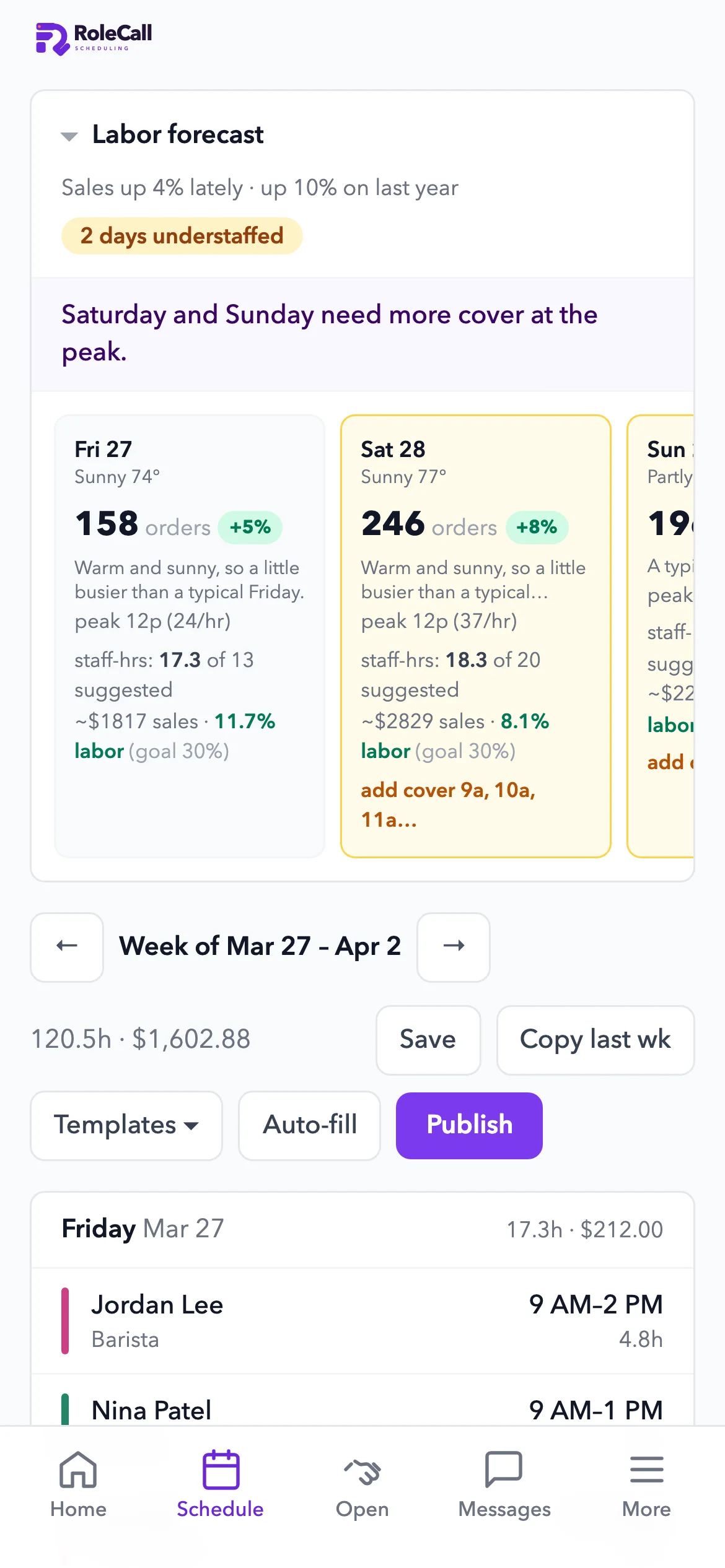
  • Understaffed days, flagged“2 days understaffed”, with the hours that need more cover.
  • Labor cost against your goalLabor % per day against the goal you set, before the week goes out.
  • The AI builds the weekIt lays out the shifts from demand, picks who works from availability and time off, and re-checks labor law. A manager publishes it.
  • The usual, done fastTemplates, copy last week, open shifts, and a push to everyone when it's published. You see who has opened it.
RoleCall in a browser: the labor forecast by day, with weather and labor cost, above the week's schedule
Backtested on
21 monthsof a real café's Square sales, January 2025 to September 2026.
Last fall
28% → 5%How far the forecast ran low in September and October 2025, before and after a fix to how it reads the season.
Overall bias
−6.7% → −0.9%Across all 21 months. Any single day can still miss, so a manager always publishes.

2.0 Inventory

Stock counts that learn. Orders that add up.

It works out how fast each item really goes, tells staff what to count and when, and builds the order list.
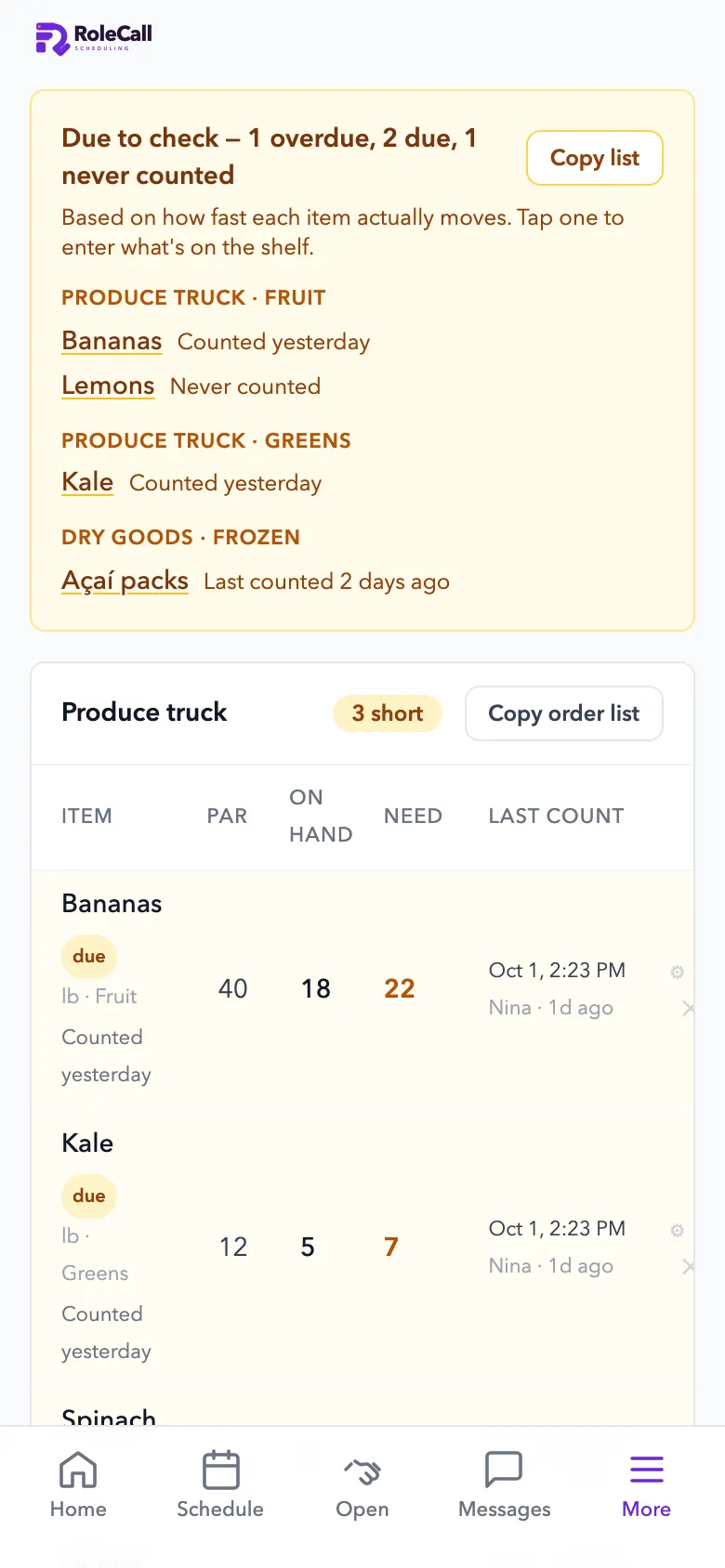
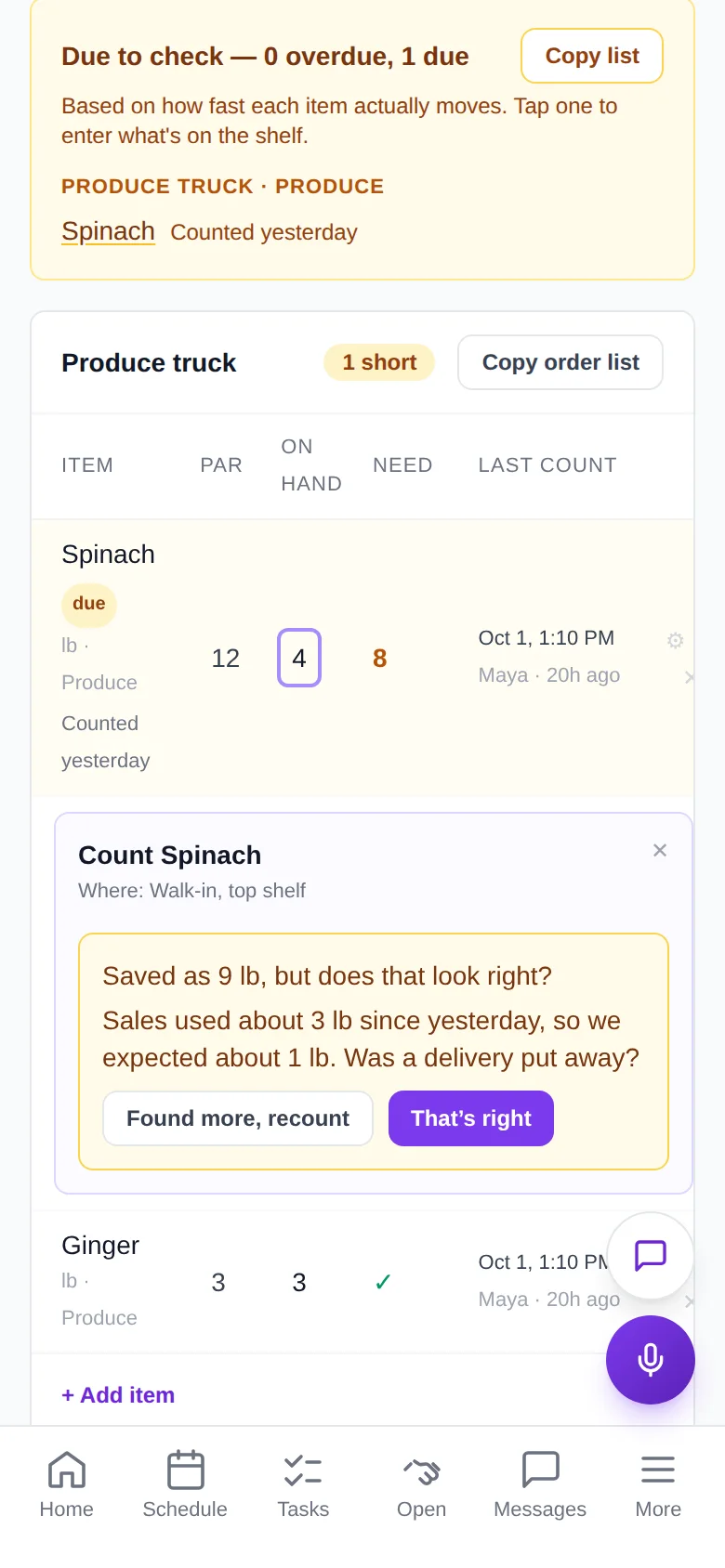
  • Usage from three signalsRecipes times your Square sales, how fast you buy it from your receipts, and shelf counts. A count that looks wrong is questioned, not trusted.
  • What to count, and whenItems due or overdue to count, and a push when something runs low.
  • Count by the packageCases, bags and tubs with photos, so a new hire counts it right. Prep backups are counted separately.
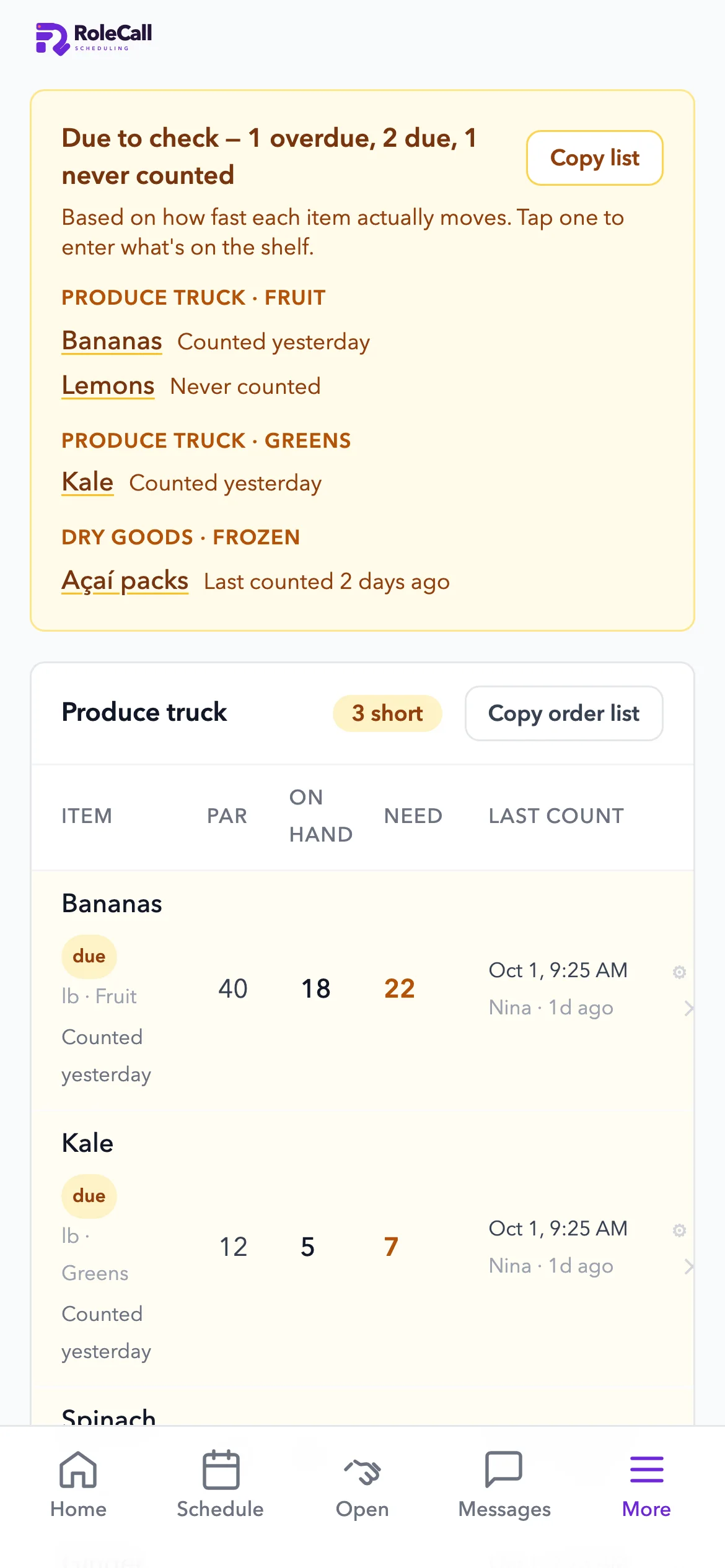
  • Order lists by supplierPar, on hand and what to order, ready to copy.
  • Recipes and food costRecipes from a photo or pasted text, and food cost from your sales next to your labor cost.
  • Ordering agent: the cheapest stores, carts filledEarly accessPlans the cheapest stores using the delivery and service fees on your own receipts, then fills the carts. You check out.

Inventory in detail

The par sheet on iPhone: what's due to count, and the produce order with par, on hand and need
Counting spinach on iPhone: the app asks whether 9 lb looks right, since sales used about 3 lb since yesterday

3.0 Run it with your voice · Available

Say it. RoleCall does it.

Owners run the business by voice. Staff get a simpler version that only touches their own work.

Owners and managersDraft and publish the week, decide time off, set pars, hire, push hours to Square.
StaffClock in, count stock, ask the manual, ask for cover, call for help.

Staff get a smaller set. Every action runs with the speaker's own login and role, checked on the server: staff touch only their own timecard, and pay stays hidden.

Things it can do
66From drafting the week to clocking in, each one limited to the speaker's role.
Hands-free
Web + iPhoneOpen mic, type, or tap to dictate. A call ends after 15 minutes, or 3 quiet minutes.
Permissions
On the serverEvery action runs with the speaker's own login, not just a prompt. On the Starter plan and up.

4.0 Tasks

Nothing slips. Everyone sees what's next.

One row on the home screen shows what needs a decision. Checklists show who did what, and when.
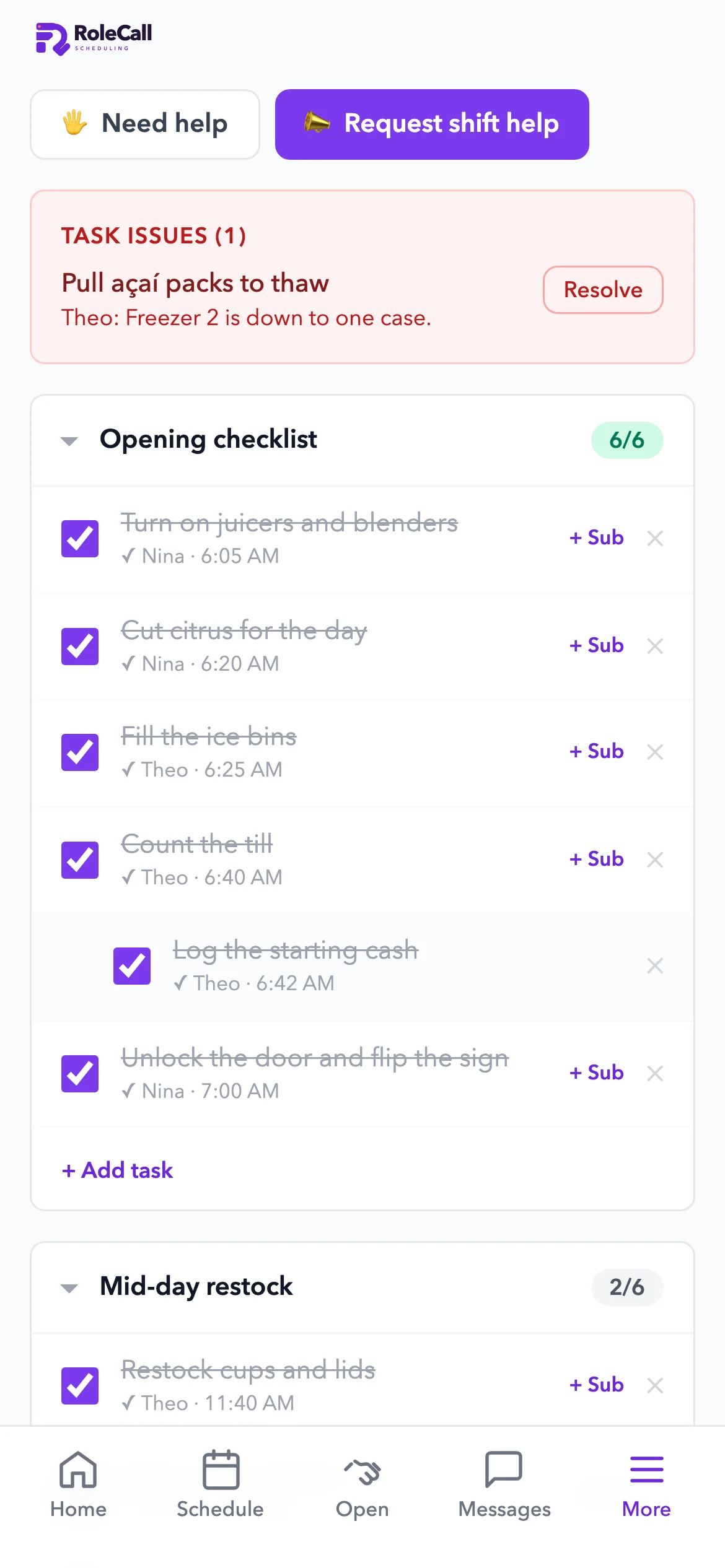
  • A Needs-you rowTime-off requests, shift requests, items low on par and open tasks, one tap away.
  • Checklists for every shiftOpening, closing and mid-day lists from a template, a pasted list or your voice. Each check-off records who and when.
  • “Can't complete” goes to managersA task someone can't finish pings every manager, with the reason.
  • Late and no-show alertsA nudge to the employee a minute late, and an alert to managers at 15 minutes.
RoleCall's home screen: who's on now, labor against the goal, and a Needs-you row
Today's checklists on iPhone, with who checked each task and when, and a task issue sent to managers

5.0 Training

Training built by talking. Asked, not reread.

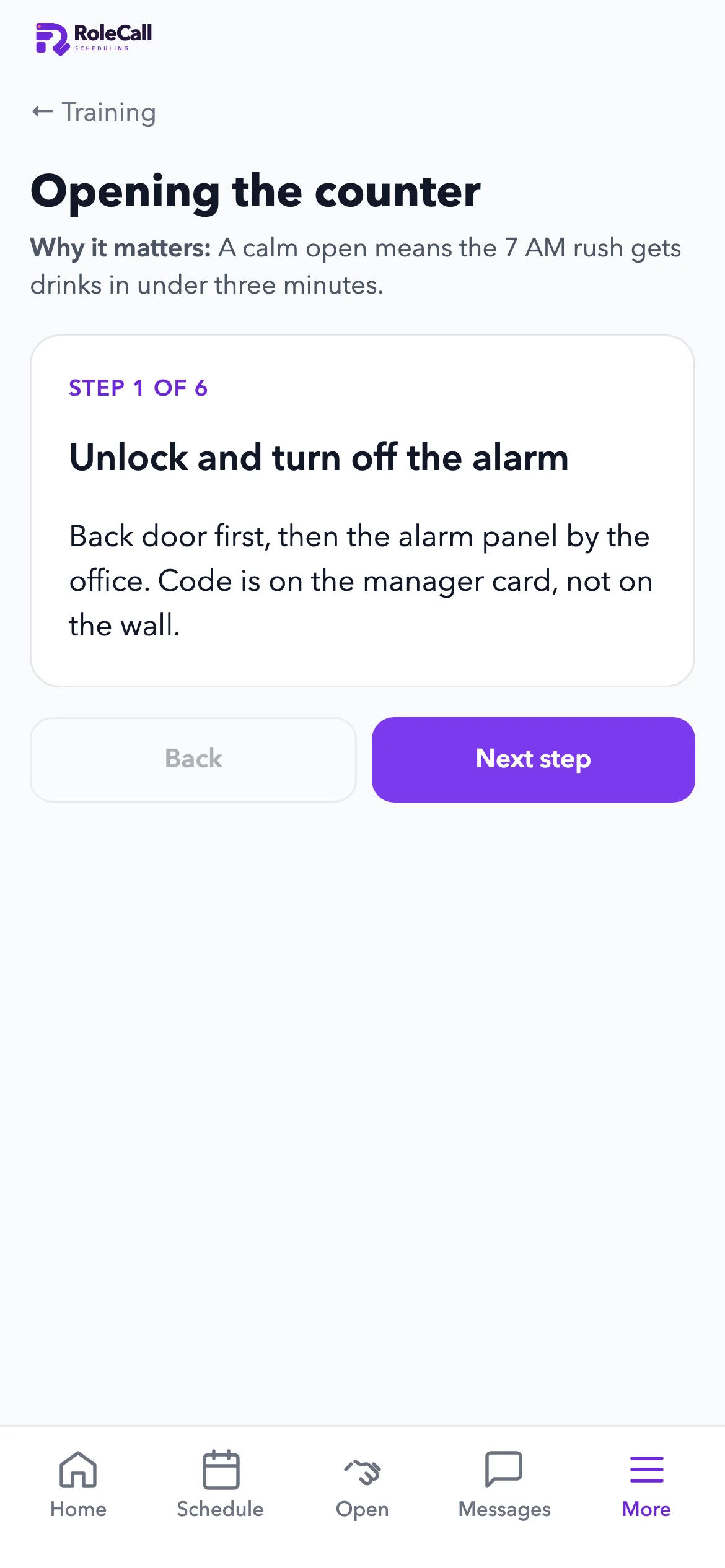
Walk through a station once, out loud. It becomes a step-by-step manual with photos, and your team can ask it how to do things.
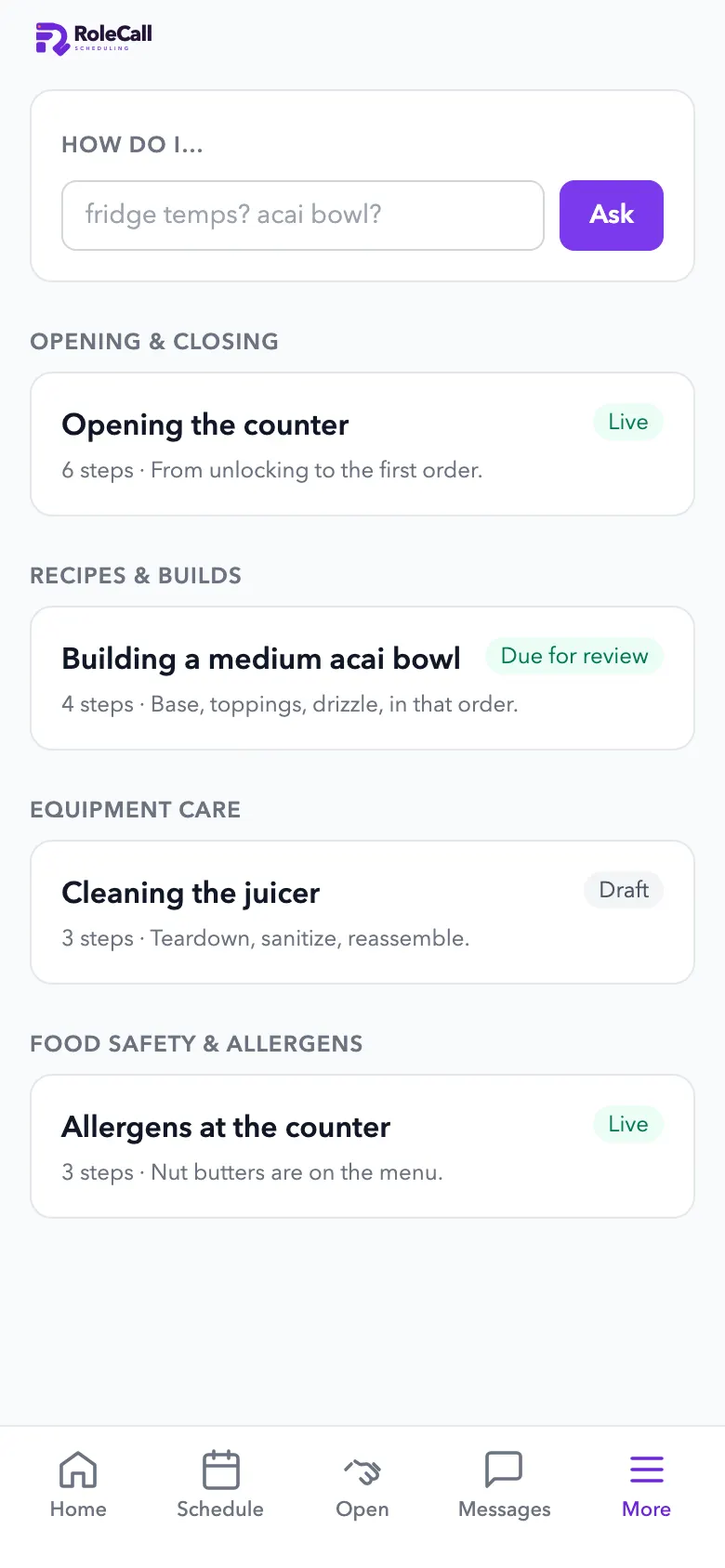
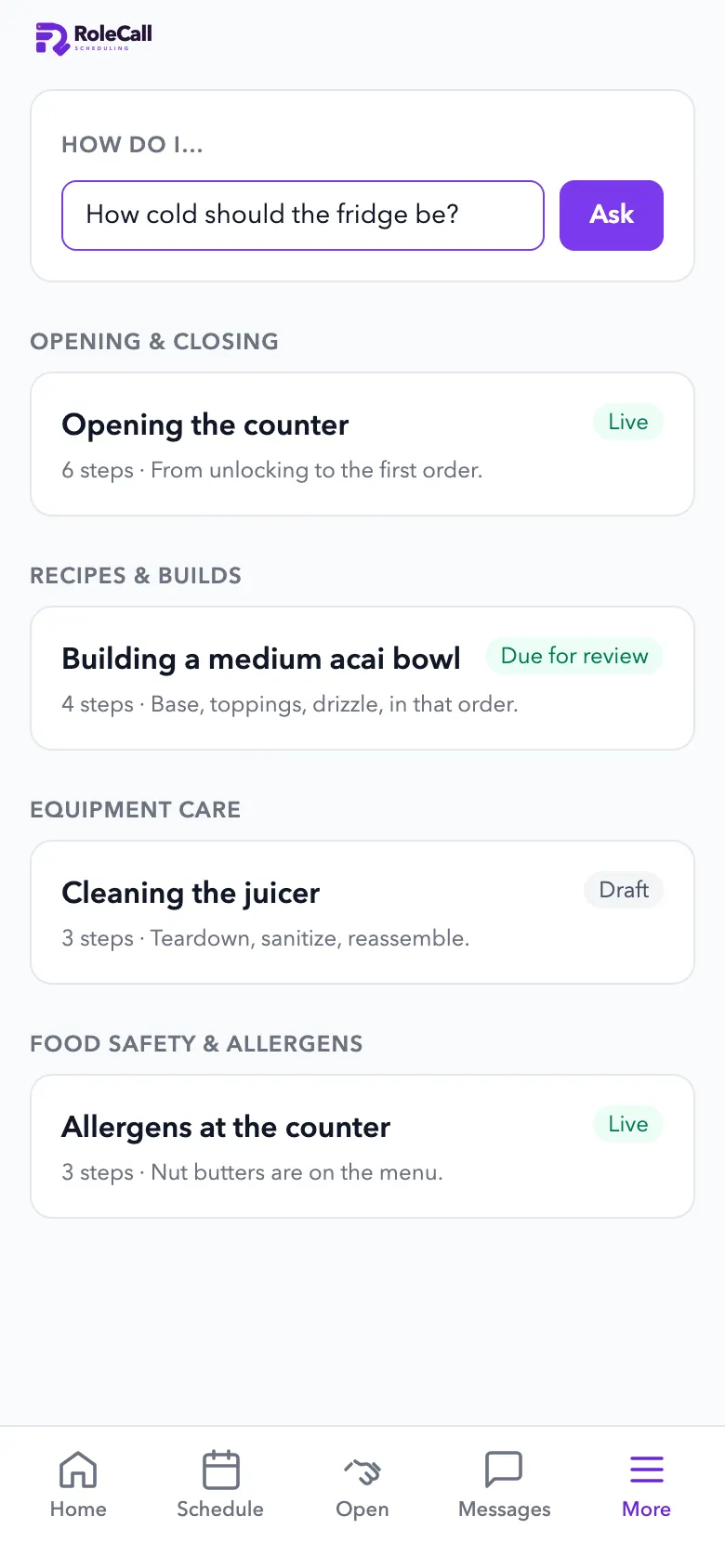
  • Talk it through onceSay the steps at the station and add photos or clips you can mark up.
  • It asks before it publishesVague amounts, unmarked photos, a missing safety warning or no “done right” check: it asks the trainer first.
  • Staff ask “How do I…?”Answers come from your own manual. Questions it couldn't answer come back to you.
  • Who's trainedA grid of who has been trained and who has been checked off on each station.
The training manual on iPhone with an Ask box for how-to questions
A training step on iPhone: Opening the counter, step 1 of 6

6.0 Time clock

A time clock that checks location. Hours ready for payroll.

Staff clock in on their phone inside your shop's fence. Timesheets flag overtime and go to Square every morning.
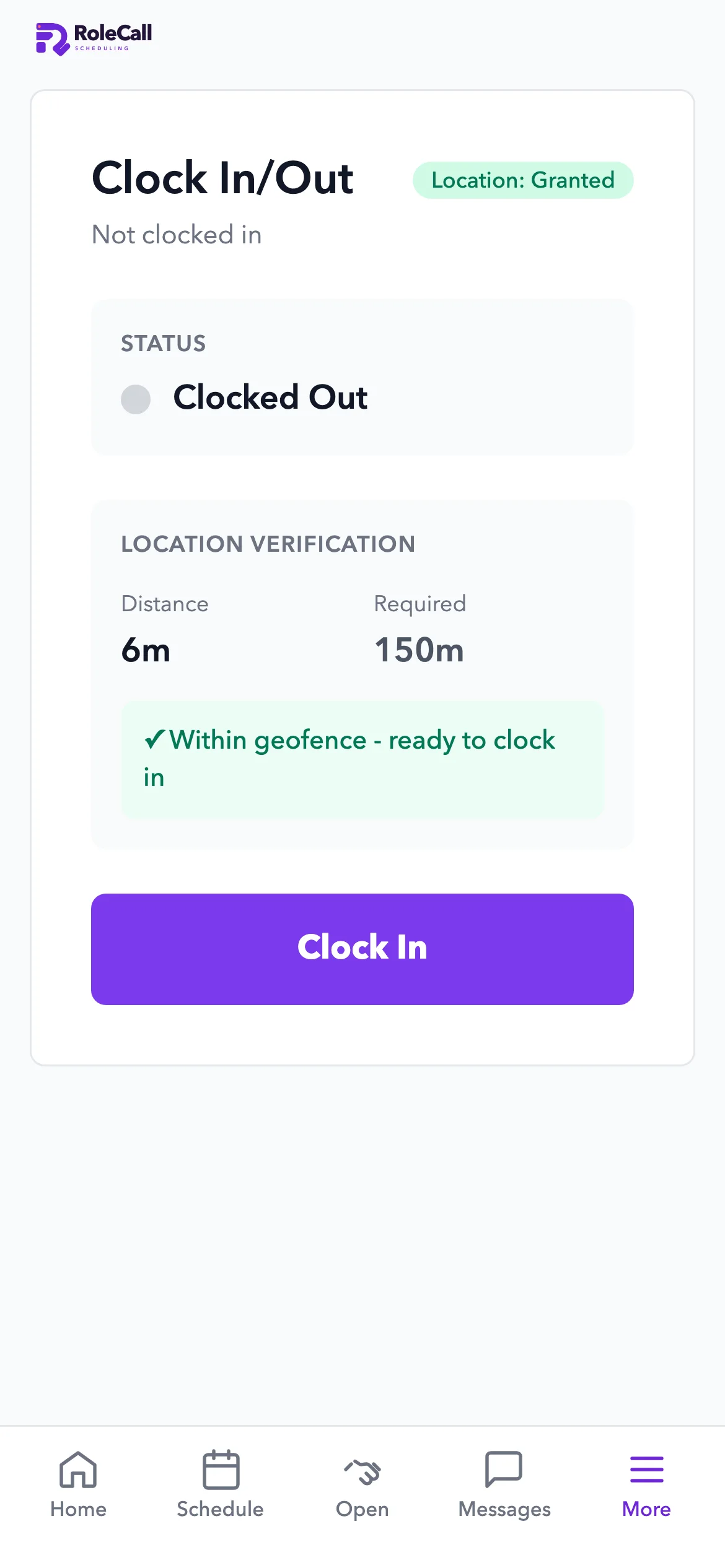
  • Inside the fenceThe phone checks how far it is from the shop before anyone clocks in. Paid and unpaid breaks.
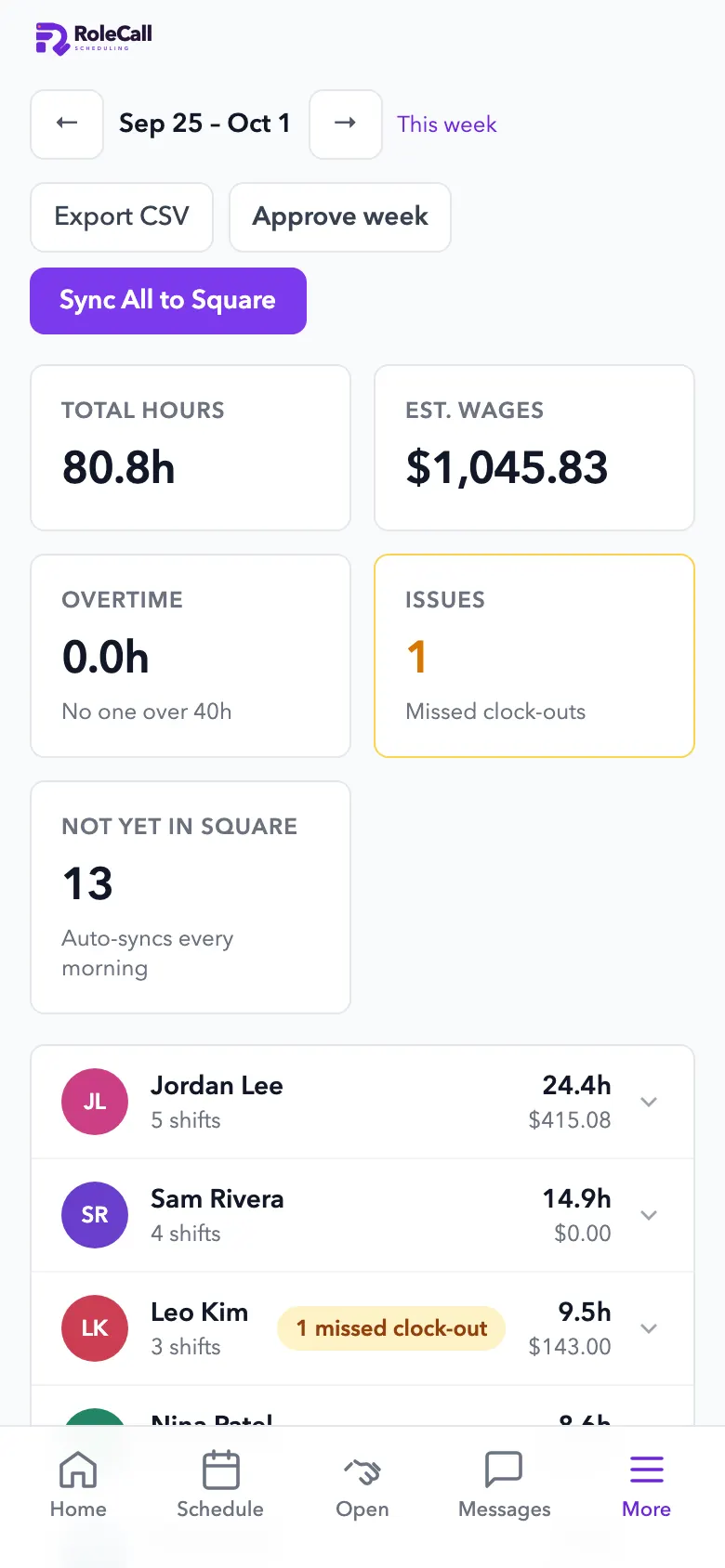
  • Overtime flagged earlyNear-overtime from 36 hours and overtime past 40, with the cost.
  • Missed clock-outs caughtFix and approve the week in one place, or export a CSV.
  • Hours to Square, every morningTimecards go to Square each day, ready for payroll. RoleCall doesn't run payroll itself.
Clocked in on iPhone, inside the shop's location fence
Timesheets on iPhone: total hours, estimated wages, overtime and a sync to Square

7.0 Team

Swaps, time off and messages. Out of the group chat.

Open shifts, swaps and time off with a decision trail, and team messages that actually reach people.
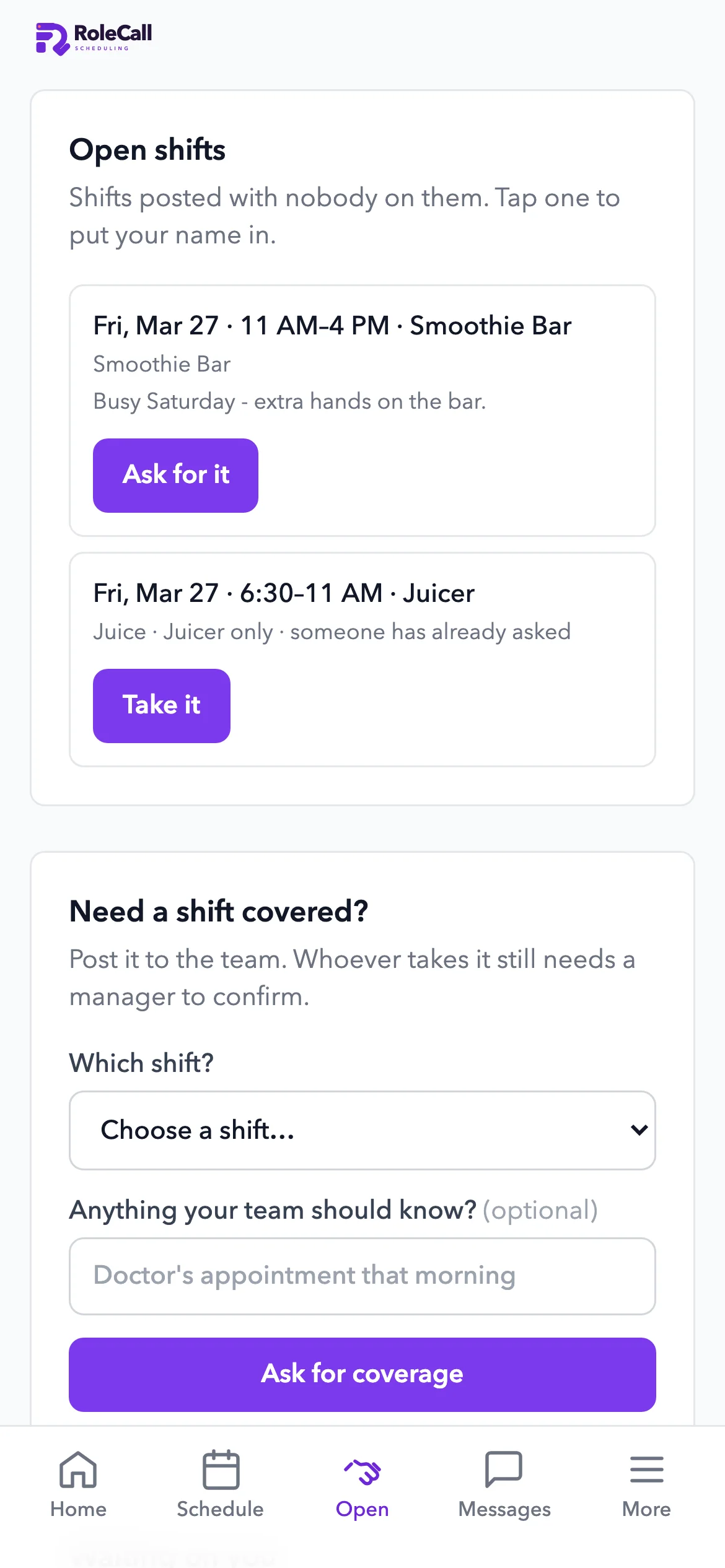
  • Open shifts and swapsStaff claim open shifts or hand theirs off. Approval is up to you.
  • Time off with a threadApprove, deny or ask a question. Approved days show up when you build the schedule.
  • Team messagesAnnouncements with @mentions and a push to every phone.
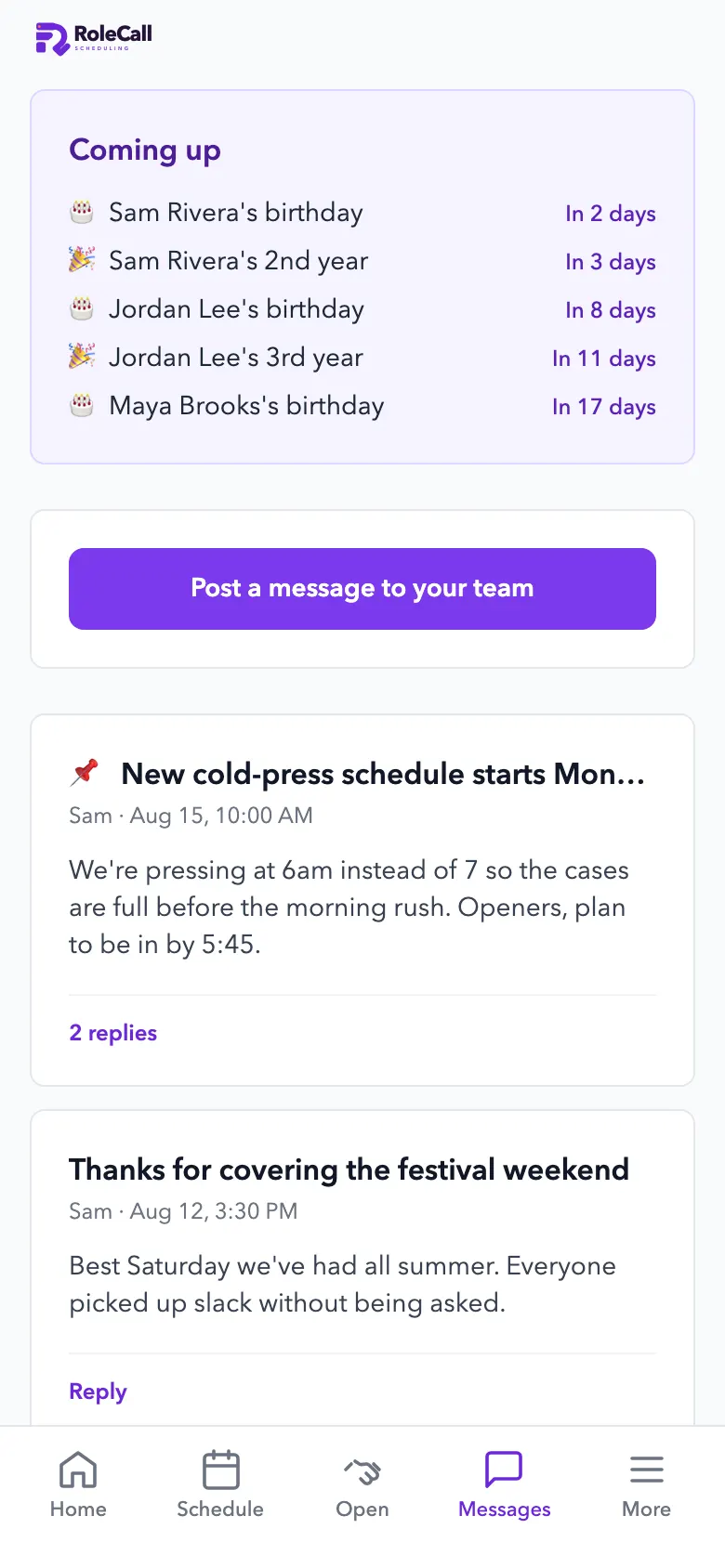
  • Birthdays and work anniversariesComing up, right on the message board.
Open shifts on iPhone that staff can claim, and a request for cover
Team messages and upcoming birthdays in RoleCall on iPhone

8.0 Hiring

Hiring from one link. Ranked for your gaps.

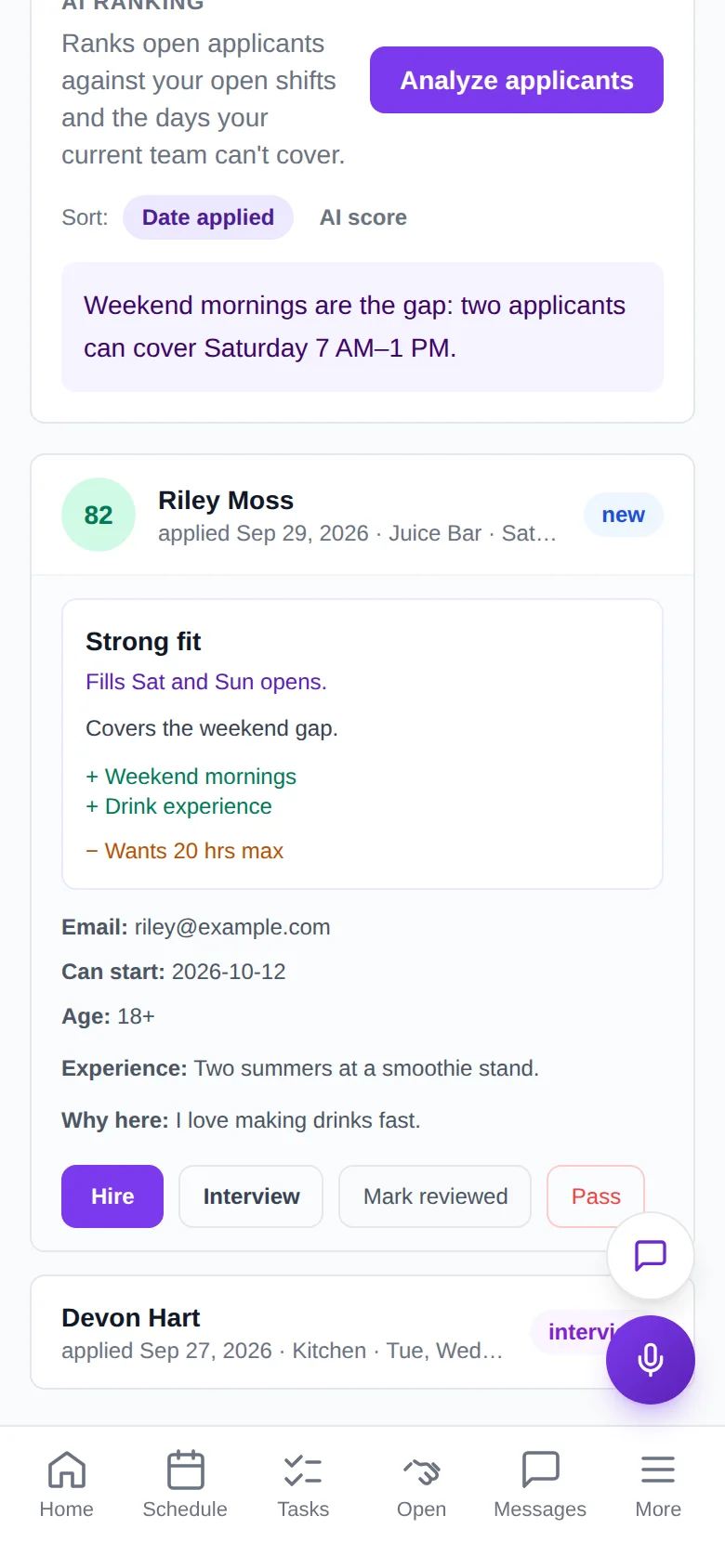
Post one apply link. Applicants answer your questions, and the AI ranks them against the shifts you actually need to fill.
  • A public apply linkWith your own application questions.
  • Ranked by AIAgainst your open shifts and the days your team can't cover.
  • One-tap hireAdds them to the roster and can fill the open shifts they match.
  • Bring your rosterPaste an export from the app you use now and it becomes your team list.
Applicants on iPhone, ranked by AI against the open shifts, with a one-tap Hire button

9.0 Built for the rules

Labor law, roles and security. Handled.

Schedules are checked against your state's rules, and everyone sees only what their role needs.

  • Labor law, all 50 statesEarly accessMinors' hours, school-day limits, start and end times, and meal and rest breaks, checked as you build the week and again on every AI-built week.
  • Roles that fitOwner, manager and staff each see what their job needs. Staff never see anyone else's pay or phone number.
  • Two-step sign-inSign-in codes on top of the password, and an access review of who can see what.
  • Audit logWho changed hours or pay, with before and after. On the Ops plan.
  • Push notificationsNew schedules, time-off decisions, swaps, messages, low stock and late clock-ins.
  • Light and darkLight, dark or match the phone, set by each person.

10.0 Who uses it

One app, three jobs.

Everyone signs in to the same place and sees what their role needs.

Owners

See the business, not just the schedule.

  • Schedules built from your sales forecast
  • Labor and food cost against your goal
  • Counts that learn your real usage
  • Hiring with a public apply link

Managers

Run the week without the paperwork.

  • Build the week with the AI schedule builder
  • Approve swaps and time off
  • Timesheets with overtime flags
  • Daily checklists and training

Staff

Everything for their shift, on their phone.

  • Their schedule and shift swaps
  • Clock in and out
  • Team messages and push notifications
  • A manual they can ask how to do things
On the webAny browser, on a laptop at the counter or a tablet in the back.
On iPhoneSchedules, the time clock, tasks and messages in your team's pocket.
Same login as your websiteSign in with the same email as your MDML account.

11.0 Plans

Priced per location. Free to start.

A free plan for up to 10 employees, and paid plans from $12 per location a month.

Compare plans
Basic$12/ location / moEverything in Free, plus hiring.
Starter$24/ location / moFull scheduling and time tracking.
Growth$39/ location / moFor busy shops that need manager controls.
Ops$59/ location / moFor operators who need an audit trail.

Early access Ordering agent: $15 a location a month on Growth and Ops. Reads your receipts and builds the store orders.

The real app

Straight from the app's public demo, with a sample team. Every moving screen on this page is built from captures like these.
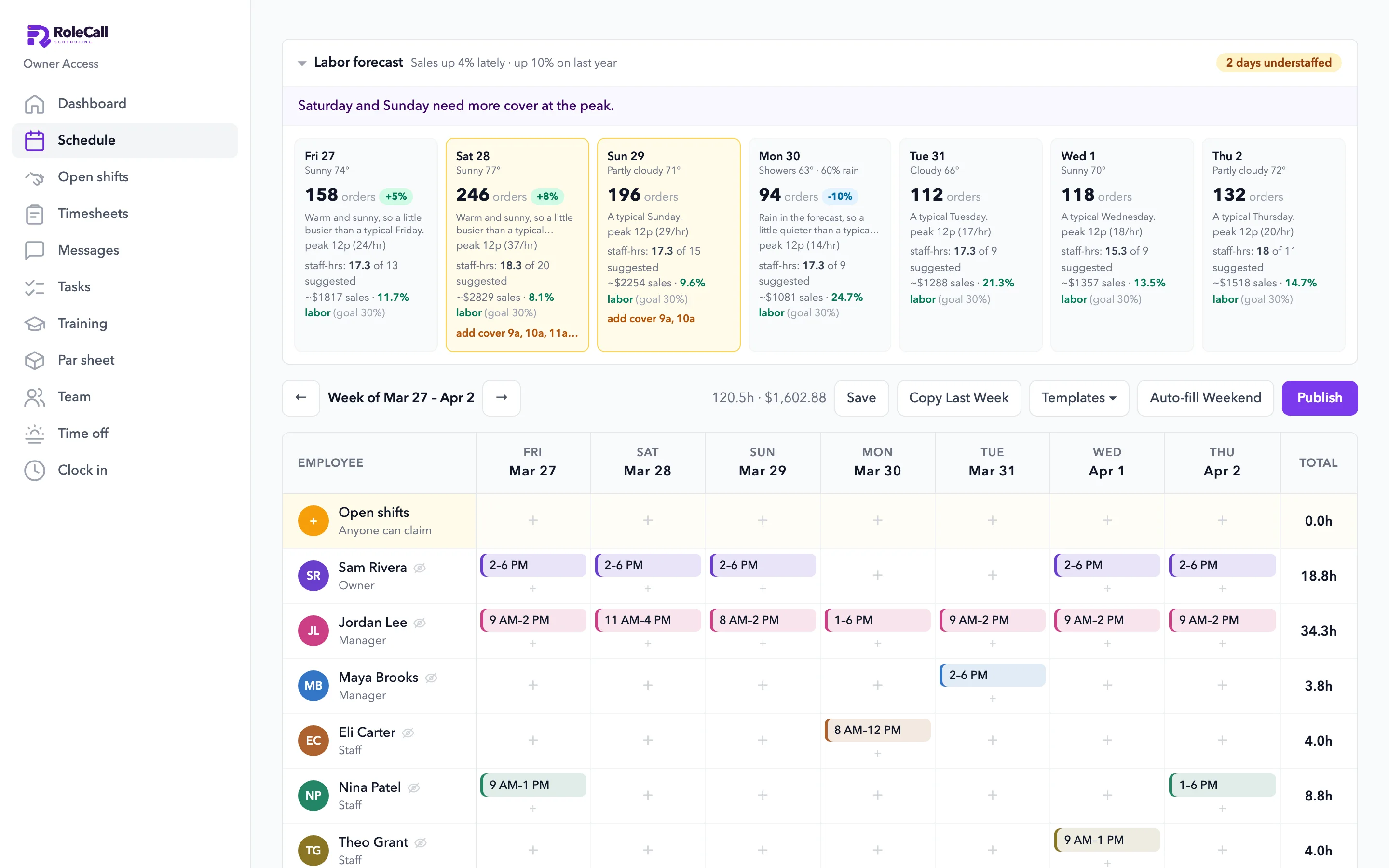
  • RoleCall in a browser: the labor forecast by day, with weather and labor cost, above the week's schedule
  • The labor forecast and schedule in RoleCall on iPhone: two days understaffed
  • The par sheet on iPhone: what's due to count, and the produce order with par, on hand and need

Free for a small team. Open RoleCall.

Up to 10 employees on the free plan. Sign in with the same email as your MDML account.