 MDML
MDMLChrome extension · MDML Connect
A form filler Chrome extension that does your business's chores.
MDML Connect is RoleCall's helper in your own Chrome. It fills your filing forms and supplier carts, files your receipts, connects your domain and looks products up, only after you approve.
Free on the Chrome Web Store. Works in Chrome on a computer.
Price
Free to add, works with your plan.
Available now
Compare every planBought one by one, all 8 parts cost $578 a month for a restaurant or shop. Everything is $249.
1.0 Fill this page
Forms filled from your saved info. You press Submit.
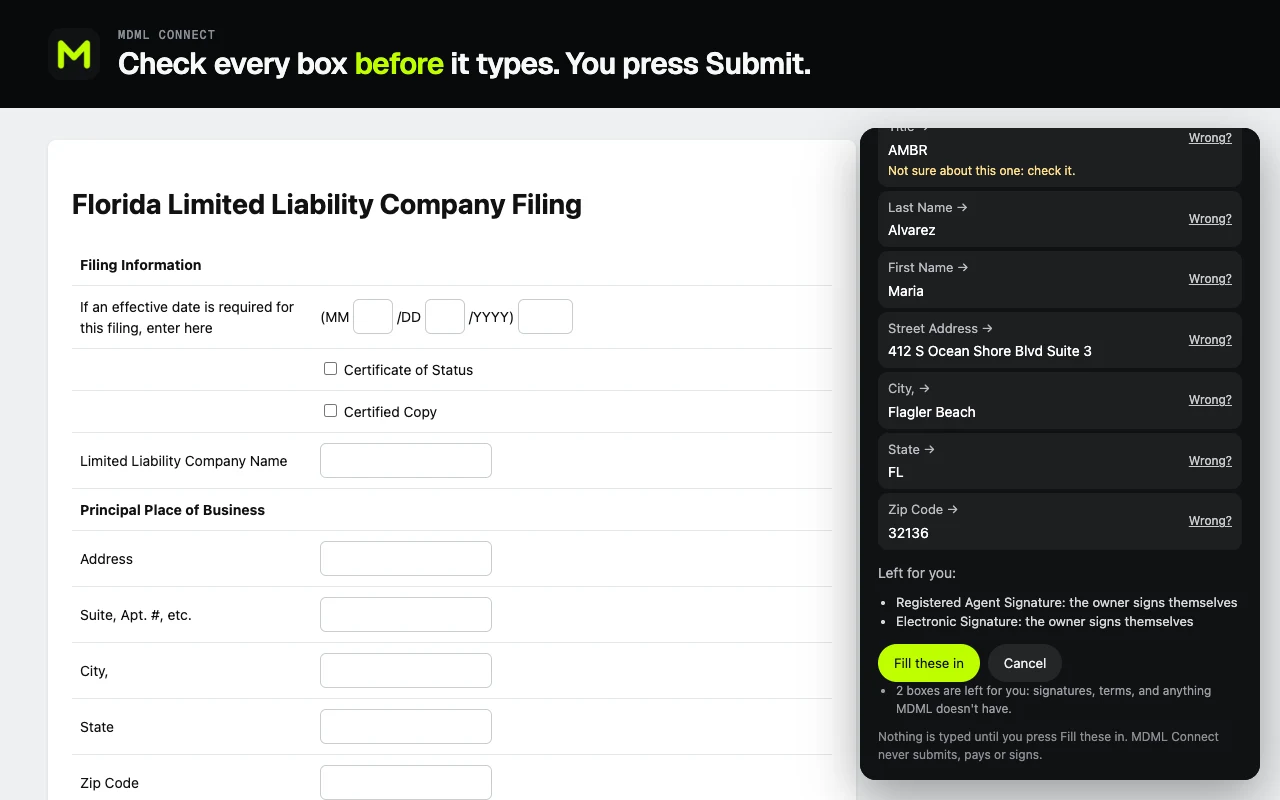
Open a business form you need to fill, like a state filing, a registration or a permit application, and choose “Fill this page with my MDML info”.
- It reads the blank formIts boxes and their labels, never what's typed in it.
- Your own answersRoleCall sends back your business's saved answers. Anything missing, it asks you once, in plain words.
- You see every box firstNothing is typed until you press “Fill these in”. Every filled box is highlighted for you to check.
- Find the official pageType what you need, like “business tax receipt”, and it finds the official government page for your location and shows where it found it.
2.0 Order
Supplier carts, filled for you. You check out.
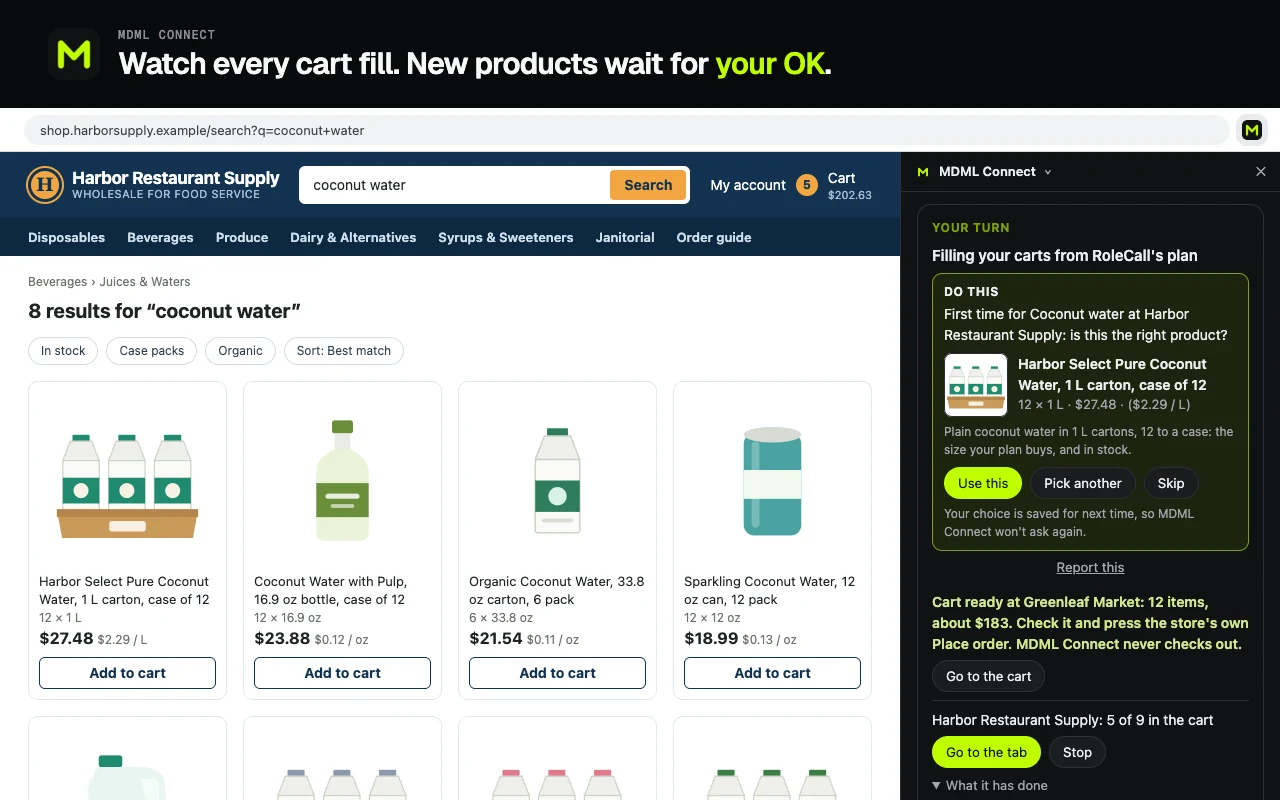
RoleCall plans what to order. Press “Fill carts now” and MDML Connect opens each store in your own signed-in Chrome and puts each item in the cart in the planned amount.
- Asks about new picksIt asks you to confirm any product it picks for the first time.
- Never removes your itemsAnything already in a cart stays there.
- Receipts filedIt opens your order history at the stores you buy from and files each new receipt in RoleCall.
3.0 And more
Your domain, products and your posts.
- Connect your domainIt opens your domain provider's DNS page. You sign in and check the changes, and it adds the two records your MDML website needs.
- Look products upFor the product finder, it searches sites RoleCall can't reach on its own, in your own browser, and reads the results.
- Your own post gridIt reads the posts showing on your own Instagram profile, so Content Studio knows what you've already posted.
- Sign out any timeIt gets a key limited to the features you approve, from RoleCall's own sign-in.
Questions
Asked and answered.
- How much is it?
- MDML Connect is free to add from the Chrome Web Store. It signs in with your RoleCall account and works with the parts of MDML your business uses.
- Does it see my passwords?
- No. RoleCall's own sign-in page opens and MDML Connect never sees your password. It never touches password, Social Security, bank or card boxes on any form.
- Will it submit or pay for a filing?
- No. When filling a filing form, it never signs, pays, submits, uploads or accepts terms for you. You check every box it filled, then press the site's own Submit yourself.
- Does it check out my supplier carts?
- “Fill carts” never checks out, and it never removes anything you already had in a cart. Only if the owner turns on Autopilot and sets a store to “Place the order” does it press that store's own Place order button, after three practice runs and inside the owner's spending limits.
- What does it read?
- Only what each job needs, on the websites you allow: a form's blank layout (never what's typed in it), a store's search results, and your own receipts with card numbers, emails and phone numbers taken out. It never reads cookies.
Goes with
More that works with it.
- Supplier orderingThe order list by supplier, from your pars and counts.
- Product finderEarly accessA product's prices and demand, before you buy it.
- WebsiteBuilt from the site you have, changed in plain words.
- Content studioWeekly post ideas and captions, from your own photos.
- Start a businessA researched plan for your idea, with the licenses and filings it needs.
Add MDML Connect. Free in Chrome.
Add it from the Chrome Web Store and sign in with your RoleCall account.